
Gaming Desk Cable Clips Keep Falling Off
If gaming desk cable clips keep falling off, the failure is usually one of three things: the pad cannot make broad contact with the desk, the adhesive bond was contaminated or loaded before it developed, or the cable keeps applying outward or peeling force. Fix the cause before reattaching: use a clean, dry, suitable mounting area, fresh compatible adhesive applied according to its instructions, and a cable path with local slack rather than persistent tension.
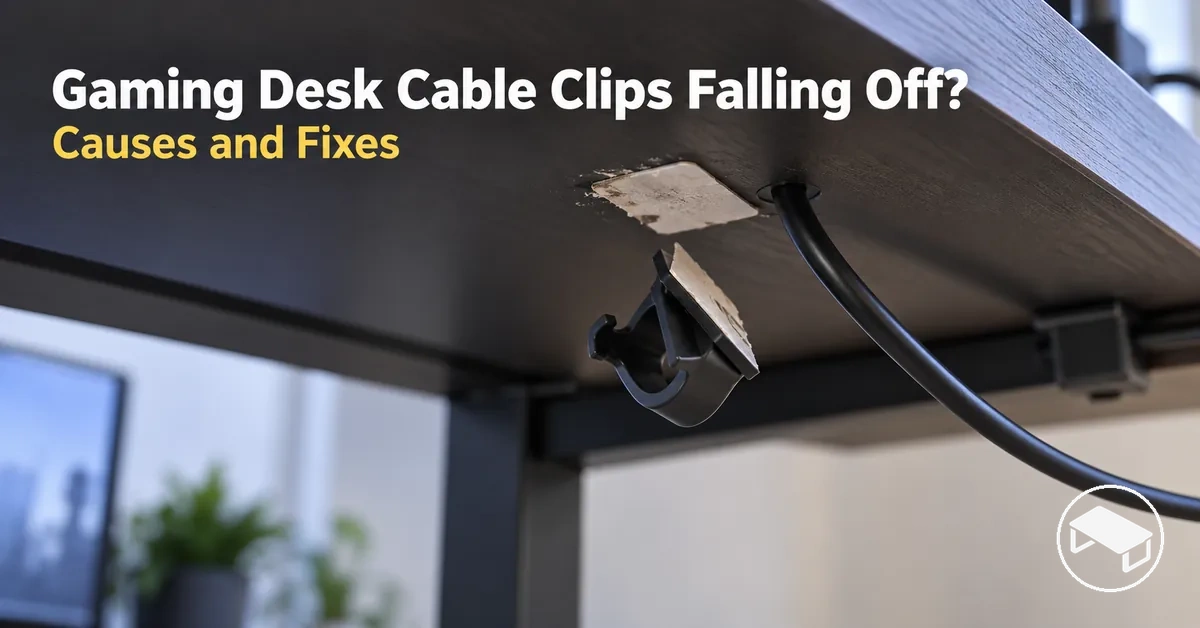
Three checks before you reattach
Find the first unresolved failure point
Answer from what you can observe. The tool checks surface contact first, then adhesive application, then cable strain, because each later check depends on the earlier mounting condition being sound.
Start with the first condition you cannot confirm.
A clip that is cleanly mounted can still fail if the bond was loaded too early or if the cable continually peels an edge away. Work through the three checks in order rather than replacing the adhesive repeatedly.
If the clip still falls after the surface, adhesive application and cable path all pass these checks, repeated detachment points to a mounting-method mismatch rather than another simple reattachment.
Table of Contents
Why Adhesive Cable Clips Detach from Gaming Desks
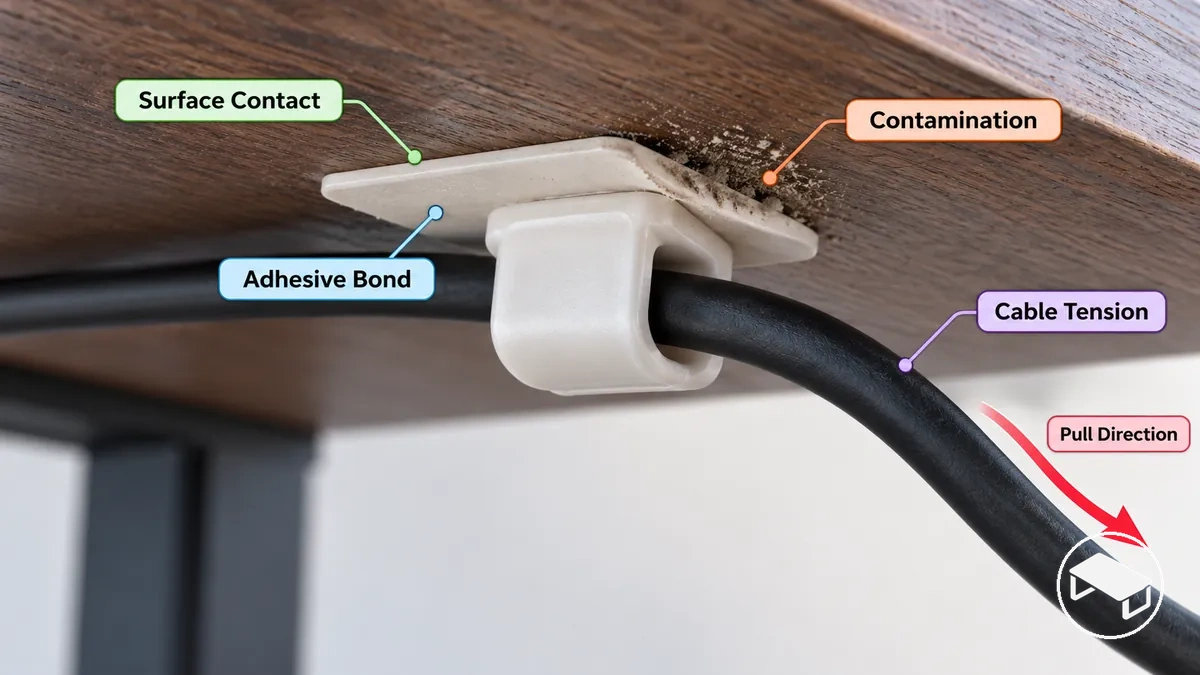
Adhesive cable clips detach when one of three relations fails: surface → contact, adhesive → bond development, or cable → mounting load. Poor contact, contamination, premature loading, and persistent cable force are different failure paths even when the visible result is the same.
Start with the mounting surface, then the application sequence, then the cable path. This order separates a surface-contact problem from a bond-development problem and from a clip that is being pulled or peeled after it was mounted.
The image shows where surface contact, the adhesive bond, and cable pull meet at one mounting point; the table maps the visible symptom to the most useful next check.
| Observed condition | Likely cause | What to check | Corrective direction |
|---|---|---|---|
| The adhesive pad does not contact the desk evenly | Surface texture or an uneven mounting area limits surface contact | Check whether the adhesive pad contacts the mounting surface across its intended bonding area | Use a mounting area and adhesive suited to the surface condition |
| Dust, oil, moisture, or residue is present at the mounting point | Contamination interrupts contact between the adhesive and desk surface | Inspect the mounting surface and adhesive contact area for visible or transferable contamination | Restore a suitable contact surface before attempting reattachment |
| The clip detaches after being loaded soon after attachment | The adhesive bond may have been loaded before its required pressure or cure conditions were satisfied | Compare the application and loading sequence with the adhesive manufacturer's instructions | Follow the specified pressure and cure conditions before applying cable load |
| The clip remains attached until the cable is routed or moved | Cable weight, stiffness, tension, or repeated movement increases force at the mounting point | Observe whether routing or moving the cable changes the force applied to the clip | Reduce avoidable cable force before relying on reattachment |
| One edge of the clip or adhesive pad begins lifting first | The cable's pull direction concentrates force toward an edge of the adhesive bond | Check the direction of cable pull relative to the clip and mounting surface | Change the cable path or clip orientation where practical to reduce outward pull on the bond |
Contamination, Texture and Low-Contact Surfaces Weaken the Bond
Contamination such as dust, oil, moisture, or residue can interrupt contact between the adhesive pad and desk surface, while a clean but rough or uneven finish can limit contact for a different reason.
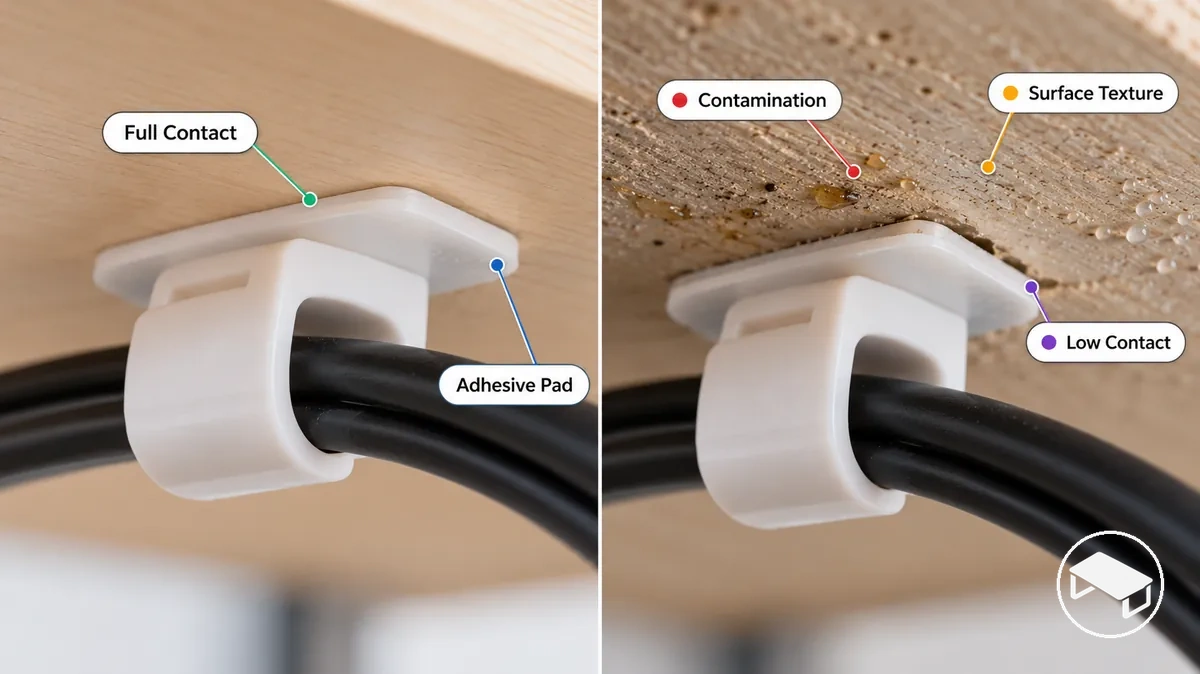
Contamination-limited contact
The surface may be smooth enough for the pad, but dust, oil, moisture or residue sits between the adhesive and desk. Use a preparation method the finish can safely tolerate, let the area dry fully, and confirm broad contact before remounting.
Texture-limited contact
The surface can be clean yet still unsuitable when rough texture, an uneven coating or too little flat area leaves gaps beneath the pad. In that case, cleaning alone does not solve the contact problem; use a flatter compatible mounting area or reassess the fixing method.
Insufficient Pressure or Cure Time Prevents Full Adhesion
Insufficient application pressure, partial pad contact, or loading the clip too soon can leave the adhesive bond unable to carry the later cable load. Immediate stickiness is not the same as a load-ready bond.
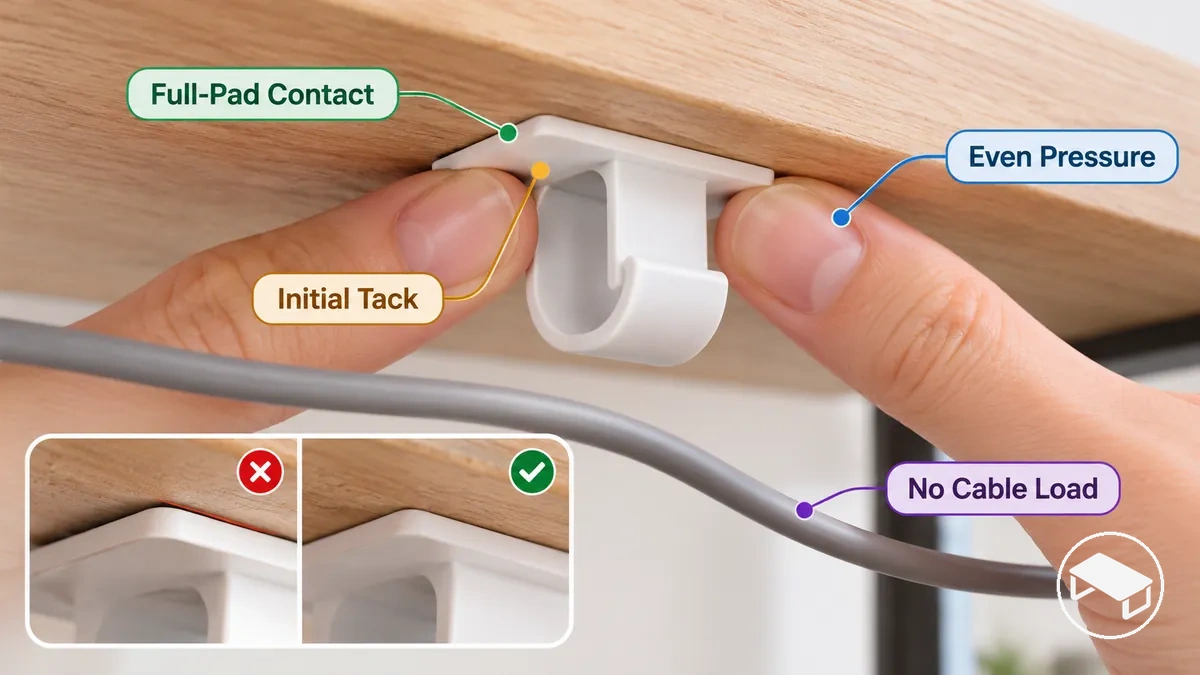
- Initial tack
- The pad grips the surface immediately, but that alone does not show that the bond is ready for cable load.
- Application pressure
- Pressure should produce broad, even contact across the pad; use the adhesive maker's specified application method rather than a universal pressure rule.
- Ready for loading
- Apply cable load only after the adhesive-specific set or cure conditions have been satisfied. The required time and conditions depend on the adhesive and surface.
Cable Weight, Stiffness and Pull Direction Can Overload the Clip
Cable load is not just cable weight. Bundle size, stiffness, bend resistance, tension, pull direction, and repeated movement can all change the force transferred into the adhesive clip.
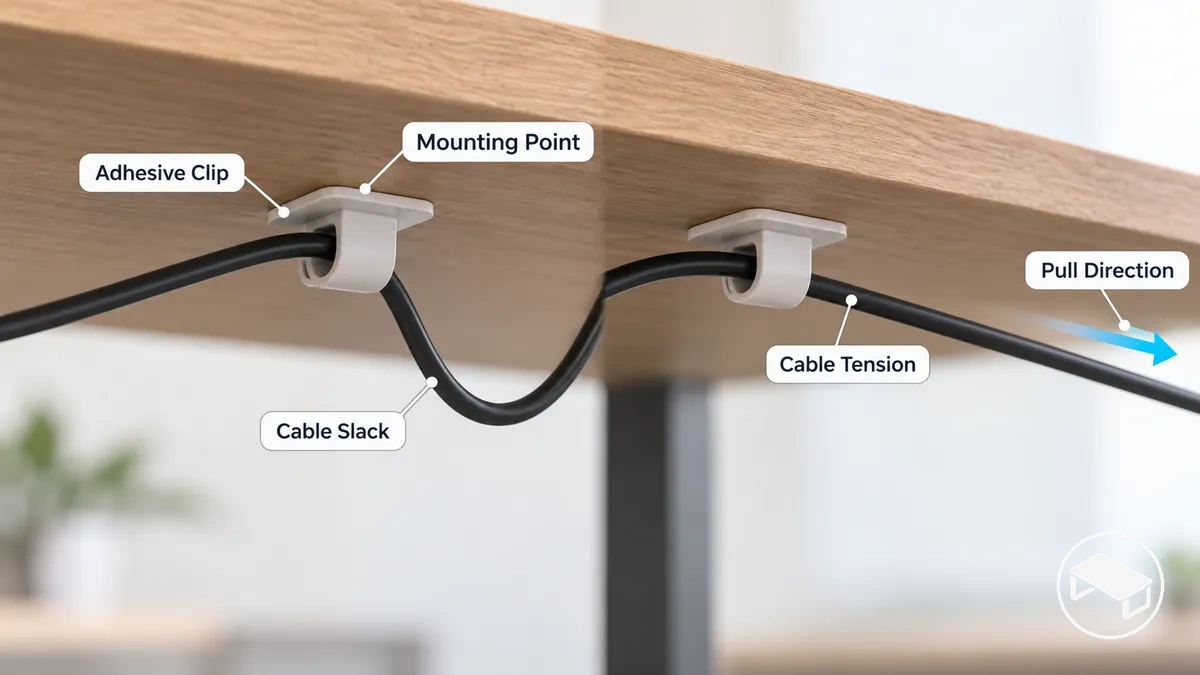
Lower-strain cable path
Leave local slack beside the clip, avoid a sharp bend at the mounting point, and confirm that normal equipment movement does not make the cable taut. This reduces continuous outward pull on the adhesive bond.
Higher-risk cable path
A taut cable, stiff connector, hanging bundle, or pull that lifts one edge can create persistent peeling or twisting force. Re-route or support the cable so the clip is not acting as the main strain-relief point.
There is no universal cable-weight threshold for a desk clip: retention also depends on the adhesive, mounting orientation, surface condition and contact area. Judge the local load by whether the cable reaches the clip with slack and stays free of persistent outward pull.
How to Reattach a Fallen Cable Clip
Successful reattachment starts by correcting the failure condition, not by pressing the failed bond back into place. Use fresh adhesive, restore a suitable contact surface, let the bond develop according to its instructions, and only then reload the cable.
- Remove the failed adhesive and loose residue from the clip and mounting surface. Clear material that would prevent full contact without using a method that could damage the desk finish.
- Prepare the mounting surface using a cleaning method suitable for the desk finish, then allow the contact area to become clean and dry. If the finish cannot tolerate the required preparation or does not provide suitable contact for the adhesive, stop rather than remounting the clip there.
- Fit fresh adhesive that is suitable for both the clip and mounting surface, then apply firm pressure evenly so the adhesive makes full contact. Follow the adhesive maker's application guidance for pressure because the required method depends on the adhesive and surface involved.
- Allow the fresh adhesive to set according to its adhesive-specific cure guidance before applying cable load. Required set or cure time depends on the adhesive and application conditions, so initial tack alone does not establish that the bond is ready for loading.
- Reload the cable with local slack so cable tension does not continuously pull the clip away from its mounting point. After loading, verify that the cable remains supported without persistent outward pull that could contribute to another detachment.
Stop before remounting if the surface cannot provide suitable contact or if the cable cannot be routed without recurring outward tension. Reattaching under the same condition simply recreates the original failure path.
Clean and Dry the Mounting Surface Before Reattaching
Prepare the existing mounting point so the contact area is free of residue, clean, fully dry, and flat enough for uniform pad contact.
Use only a cleaning method the desk finish can safely tolerate and that is compatible with the adhesive guidance; a surface should not be damaged or abraded simply to force adhesion.
- Remove loose residue, dust, and debris from the mounting surface without scraping or abrading the surface finish.
- Clean the contact area using a method suitable for the desk material and surface finish. Use only a cleaning method that the surface can safely tolerate and that is compatible with the adhesive guidance.
- Allow the contact area to dry fully before applying adhesive. Verify that no visible moisture or cleaning residue remains where the adhesive will contact the desk.
- Verify that the prepared mounting point provides a flat, suitable contact area for the adhesive. If the surface finish is damaged, highly uneven, or incompatible with the required preparation method, stop rather than altering the finish to force adhesion.
Use Fresh Adhesive, Apply Firm Pressure and Let the Bond Cure
Use a fresh, uncontaminated adhesive pad that is suitable for both the clip and the desk surface, then press it into broad, even contact before any cable load is applied.
Pressure, temperature or surface conditions, and set or cure time are adhesive-specific. Follow the adhesive maker's instructions rather than treating initial tack as proof that the clip is ready to carry the cable.
- Fit fresh adhesive or a replacement pad that is undamaged and uncontaminated. Verify that the adhesive is compatible with the desk surface finish rather than assuming a stronger adhesive is automatically suitable.
- Align the clip and replacement pad at the mounting point before pressing them into place. Verify that the pad covers the intended contact area without folds, overhang, or misalignment that would prevent full-pad contact.
- Apply firm pressure evenly across the full adhesive pad. Follow the adhesive maker's application instructions for pressure and any relevant temperature or surface conditions rather than assuming a universal pressure duration.
- Allow the adhesive bond to set according to its specified cure guidance before applying cable load. Treat the clip as ready for loading only after the adhesive-specific set or cure conditions have been satisfied, rather than relying on initial tack alone.
Reload the Clip Without Excess Cable Tension
Reload the cable so the local path does not recreate the force that caused detachment: leave slack beside the clip and avoid persistent pull away from the mounting surface.
A sharp bend, stiff connector, hanging weight, large bundle, or equipment movement can transfer force back into the clip even after a successful remount.
Before relying on the reattached clip, verify all of these conditions:
- Check that local slack remains beside the cable clip rather than the cable being pulled taut.
- Check that a sharp bend near the clip does not direct the cable away from the mounting surface.
- Position a stiff connector so its bend resistance does not maintain outward pull at the clip.
- Check that hanging weight or bundle size does not place persistent downward or outward load on the mounting point.
- Move connected equipment through its normal local movement and check that the cable does not become taut or tug the clip.
- Verify that the pull direction supports the cable without visibly lifting or peeling an edge of the clip away from the mounting surface.
If the cable still becomes taut, lifts an edge, or repeatedly tugs the clip during normal movement, reduce that strain before relying on the adhesive mount.
Passing this check means immediate cable tension has been reduced; it does not guarantee long-term retention, because surface condition, bond quality and later movement still matter.
When Reattaching an Adhesive Clip Will Not Solve the Problem
Reattaching an adhesive cable clip is unlikely to remain reliable when repeated detachment continues after correct preparation or when the desk surface and cable load keep recreating the same failure condition.
Retry adhesive mounting when
- The previous failure came from a correctable preparation or application problem.
- The desk surface can provide broad, uniform contact for a compatible adhesive pad.
- Fresh adhesive can be applied and allowed to meet its specified set or cure conditions before loading.
- The cable can reach the clip with local slack and without recurring outward pull.
Change the fixing method when
- Detachment continues after the surface and adhesive have been prepared and applied correctly.
- Texture, coating or limited flat area prevents dependable contact across the adhesive pad.
- A heavy or stiff cable, sharp bend, or regular equipment movement repeatedly creates peeling or twisting load.
- The setup needs removable or mechanical retention instead of a bond that depends on the desk surface.
Decision rule: retry adhesive mounting only when the original failure condition can be corrected and kept corrected. Otherwise, changing the fixing method is more useful than repeatedly replacing the pad.
Choose any alternative by the same core criteria: mounting surface, cable load, required movement, and need for removable retention. A mechanical clip, clamp-based holder, or reusable tie can be appropriate when those conditions fit, but no non-adhesive category is automatically suitable for every desk.